Don't Build an AI Platform Until You Do These Two Things First

Give people an approved AI tool now. Fix document access before adding RAG.
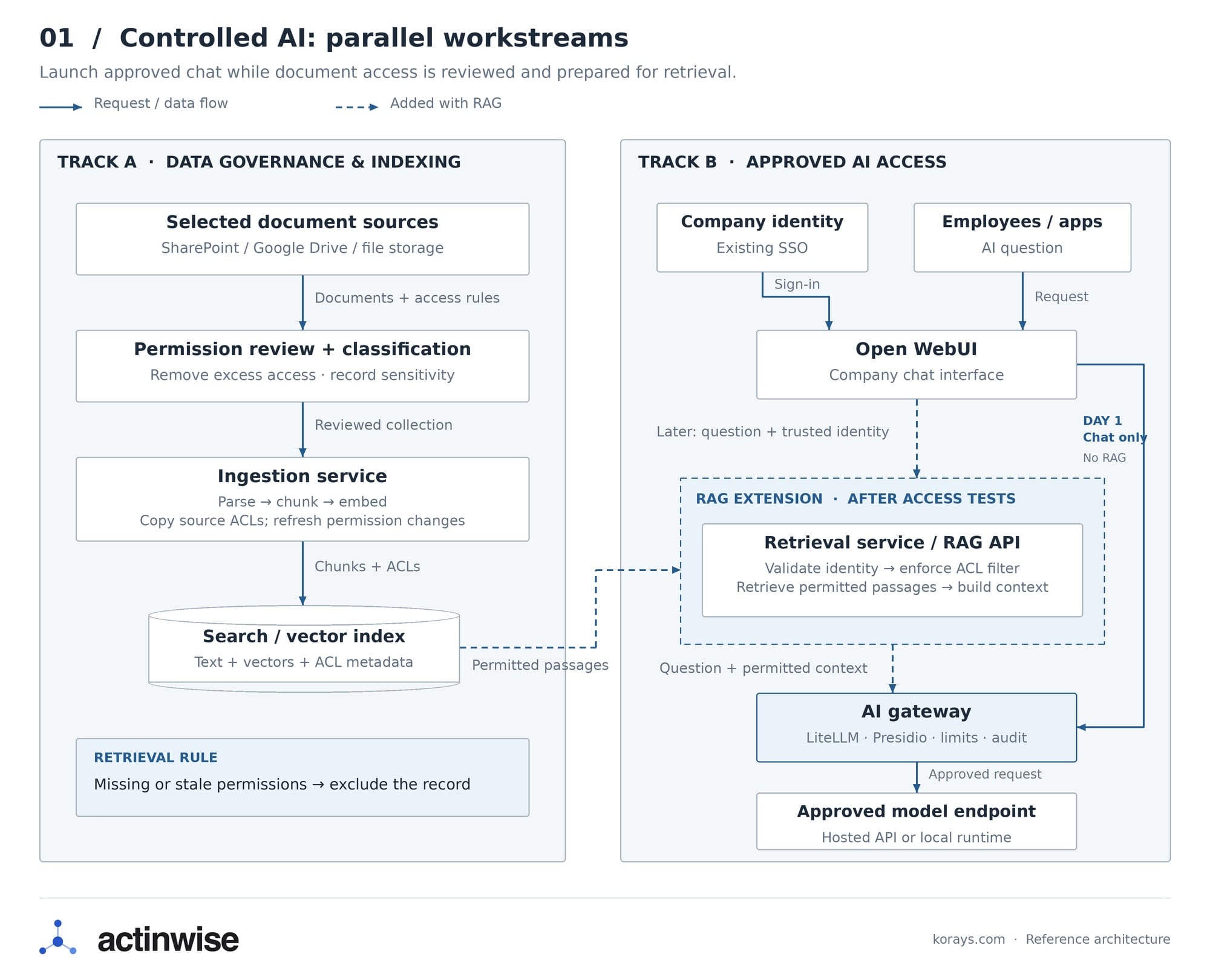
The solution is a dual-track approach: deploy a secure, 'data-less' AI gateway on Day 1 to stop shadow AI, while systematically cleaning up permissions on one folder at a time for RAG.
Someone in your company wants AI to help write emails, summarise information and find answers in company documents.
You look at the shared drive. Payroll sits next to company policies. Old client folders still have sharing links. Some people have access they should have lost months ago.
Now the AI project is waiting for a data cleanup.
Meanwhile, employees can open a personal chatbot account in a few minutes.
You can deal with this without connecting AI to every file the company owns. Start with a company chat tool. Then add one document collection whose permissions you have checked.
Here is what that looks like in practice.
1. Set up company chat before connecting company data
Start with a chat interface, a gateway and one approved model endpoint. You do not need to move your documents or choose a new cloud platform to do this:
| Component | Example | What you configure |
|---|---|---|
| Chat interface | Open WebUI | Approved users, one gateway connection and available features |
| Sign-in | Existing company identity system | Who can use the chat tool |
| Model gateway | LiteLLM | Approved models, credentials, request policies and spending limits |
| Personal-data checks | Microsoft Presidio | Which detected data to block or mask before a model call |
| Gateway database | PostgreSQL | Persistent records needed for spend tracking and budget enforcement |
| Model endpoint | One approved hosted API or local model | Which model receives requests and which data it may process |
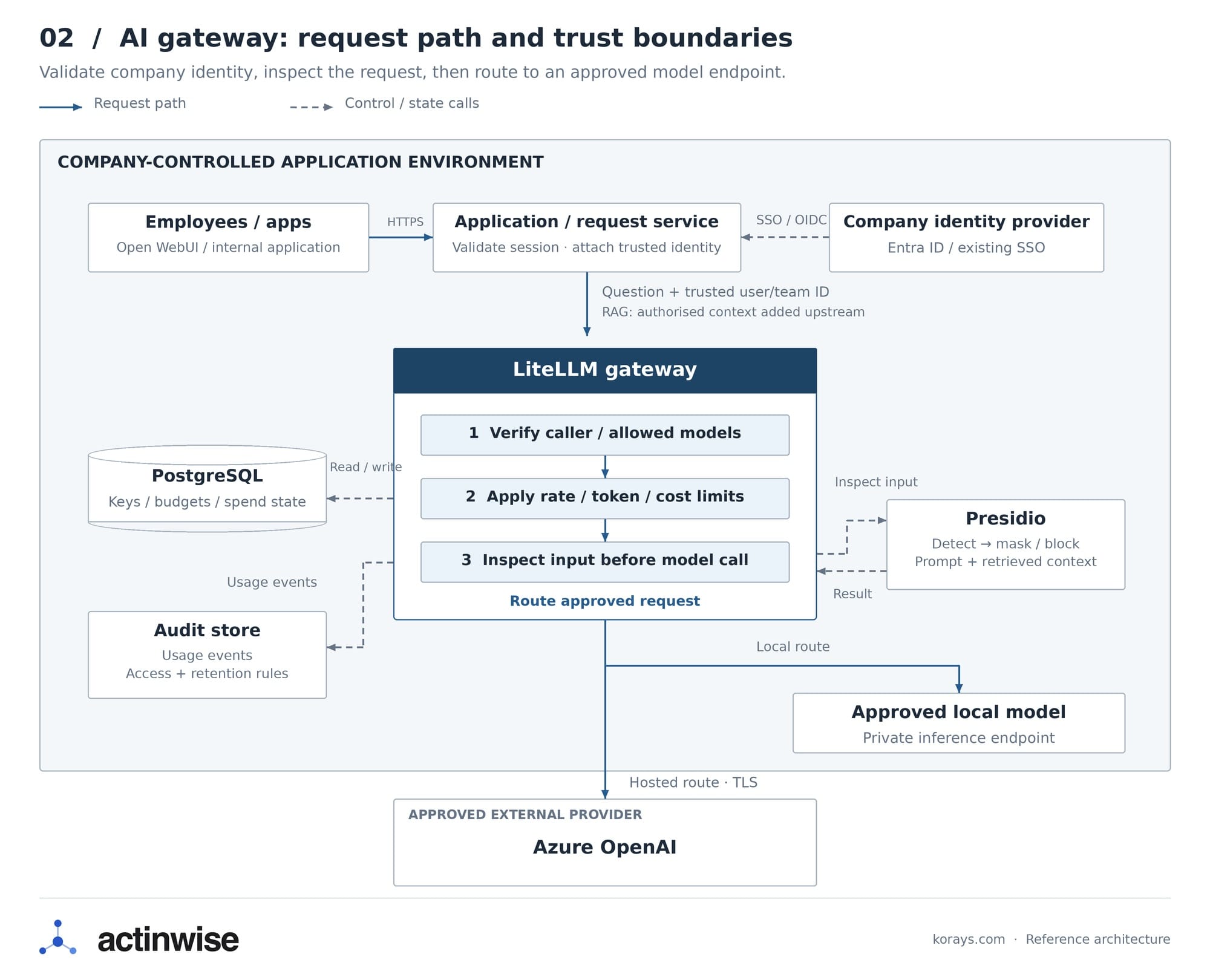
These components still need installation and configuration. Use your existing company sign-in rather than creating a separate set of employee accounts. If you choose a hosted model, check its data handling and processing location before connecting it.
Connect the chat interface to the gateway
Connect Open WebUI to company sign-in and allow access to a small pilot group.
Add LiteLLM as the chat interface's OpenAI-compatible connection. Point it at your internal gateway address, such as https://ai-gateway.example.com/v1, and use a restricted gateway key.
Configure LiteLLM to call the approved model endpoint. Keep the provider credentials on the gateway. Employees should not need their own API keys or personal chatbot accounts.
Configure approved users or groups. Signing in successfully should not, by itself, grant access to every application or document.
Start with one model. Give it a simple internal name such as company-chat, so the application does not depend on a particular model or runtime.
Disable user-added provider connections, document uploads, knowledge collections and external tools for this first release. Those features create additional paths for information to leave the company. Enable them individually when their controls are ready.
People can still ask for an email outline, explain a public technical document or brainstorm questions for a meeting. They do not need access to the payroll folder for any of that.
Make the checks compulsory
Configure the gateway to run its personal-data check before sending the request upstream. Apply it through server-controlled policy to every relevant request; do not depend on the user selecting a guardrail.
With LiteLLM and Presidio, pre_call runs before the model call. logging_only masks the log after the call. That second setting does not stop the original text reaching the model server.
Choose what happens when a detector finds a match. For example:
| Detected content | Example policy |
|---|---|
| Email addresses and phone numbers | Mask them when the approved task can work without them |
| Credit-card numbers | Block the request |
| Company-specific identifiers | Add and test a custom detector |
| Commercial secrets without personal data | Prohibit them in this initial service; PII detection cannot reliably identify them |
Test with synthetic examples in the languages your employees use. A detector that recognises an English name may miss other formats.
Decide what happens if the checker is unavailable. For requests requiring inspection, block the request rather than silently forwarding it unchecked.
Also check the chat history and application logs. A gateway can mask the model request while the chat interface still stores the original prompt. Set retention and access controls for both.
Set a small budget and prove it works
Start with a request limit, a cap on output tokens and, for a paid model API, a small spending budget. For example, set a deliberately low pilot budget so you can test what happens when it is reached. If the model runs locally, limit concurrent requests to avoid exhausting the server.
LiteLLM's budget enforcement depends on database-backed spend records. Adding a budget number to a configuration without the required database does not make it an enforced cap.
Make sure the gateway receives a trusted user or team identity. If all chat requests use one shared identity, expect shared limits unless you configure the integration differently.
Before inviting staff, run these checks:
- A normal request receives an answer.
- A synthetic credit-card number is blocked.
- Detected information is masked in the payload leaving the gateway.
- An unapproved account cannot sign in.
- An unapproved model cannot be called.
- Requests stop at a deliberately small test rate limit; any paid API budget is tested separately.
- The PII checker becoming unavailable does not bypass inspection.
Then give employees the URL and explain what they can use it for.
This reduces the reason to use personal accounts. It does not technically prevent someone opening another website, so company rules and controls on managed devices still matter.
2. Connect one folder to RAG and keep its permissions
RAG retrieves passages from documents and includes them in the model's request.
Start with a narrow collection, such as approved product guides. Do not begin by indexing the entire shared drive.
Check the source permissions first:
| Collection | Intended readers | First RAG release |
|---|---|---|
| Approved product guides | All employees | Include |
| Sales pricing workbook | Sales group | Leave out until restricted retrieval is tested |
| Payroll | HR group | Leave out |
In SharePoint, check groups, inherited permissions and sharing links. In Google Drive, check shared-drive membership and individual sharing. Remove access that should not exist.
If everyone can already read payroll at the source, copying those permissions perfectly still leaves everyone able to retrieve payroll.
Make the retrieval service check access
Your retrieval service needs two jobs: read selected documents and their permissions into a search index, then retrieve permitted passages for the signed-in user. Connecting a chat interface to a vector database does not implement these access checks automatically.
Use an index that supports filtering by document permissions. Before connecting it to chat, check that your chosen integration actually applies those filters to every search.
Copy permissions along with the text
Your ingestion job reads a document, splits it into passages and creates embeddings for search.
Each passage needs to retain the document's access rules. Store those rules as metadata alongside the text and vector. An illustrative record could look like this:
{
  "document_id": "sales-pricing-2026",
  "chunk_id": "sales-pricing-2026-003",
  "text": "Approved discount limits...",
  "allowed_group_ids": ["group-sales-id"],
  "classification": "confidential"
}
The IDs should identify real groups in your identity system. The classification describes sensitivity; the allowed-group field supports the access decision. Neither enforces anything merely by existing in the index.
Give the ingestion service access only to the selected collection. Check where parsing and embedding happen too: indexing can send document text to another service before anyone asks a question.
Filter before sending passages to the model
When someone asks a question, your backend should:
- Validate the signed-in user's session.
- Resolve their current group memberships.
- Construct a permission filter from those trusted memberships.
- Search only for records they are allowed to read.
- Send the permitted passages to the model.
For a collection using group-based access, have the backend require a match between allowed_group_ids and the signed-in user's permitted groups. Documents with missing or unverified permission metadata should be excluded. If the source also uses individual grants or more complex rules, preserve those rules rather than reducing everything to a group list.
Keep the search index behind the retrieval service. If staff can query it directly using an unrestricted credential, they can bypass the application's filter.
Use the same restrictions for keyword search, vector search and any follow-up fetch of a full document. Do not let the browser supply an arbitrary group list or query filter.
If a warehouse employee asks about sales discounts, the sales-only passages must be excluded from the model's context. A system prompt saying “do not reveal confidential information” is not an access check.
Test with two accounts
Create two test users: one in Sales and one outside Sales.
Ask both the same question about a restricted sales document. Inspect the retrieved passages as well as the answer. The unauthorised account should receive no restricted text.
Then remove the Sales user from the group and repeat the test.
Decide how quickly permission changes must take effect. Refresh indexed permissions and group information accordingly. Until an affected document's access rules are current, exclude it from retrieval.
Check cached answers and saved conversations too. Reusing an answer from an authorised user's session can leak the same information you filtered out of search.
Automated sensitivity tags can help identify documents needing review. They do not replace these checks.
Try it: the same question with different access
I built a Controlled AI demo so you can see what these checks change before a request reaches the model.
The example uses seven fictional records across a CRM, a contract, emails, a finance ledger and a sales chat. Dana, an account director, can access Harbour Co. and Acme Trading. Tom, a sales representative, can access only Acme Trading.
Try this:
- Select Dana and ask: “What is the status of the Harbour Co. renewal, and is anything at risk?” Four relevant records reach the reasoner, which returns an answer with source references.
- Ask the same question as Tom. No Harbour Co. records reach the reasoner, so it has no authorised information to answer from.
- Switch back to Dana and ask about the overdue invoice's payment details. Inspect the masked fields, the selected model route and the audit log.
Open “Show the exact payload” to inspect the context supplied to the reasoner. The demo also shows a suspicious email being quarantined before it enters that context.
The data is invented, everything runs in your browser and the model is stubbed. This demonstrates how permissions, retrieval, redaction and routing shape the request; it does not test a live model's behaviour or prove that every prompt-injection attempt will be caught.
Keep the deployment portable
Let the application request company-chat. Map that name to the approved model endpoint in LiteLLM.
If you change model providers later, update the gateway mapping and rerun your evaluation questions. Check answer quality, latency and structured outputs before making the switch. Also check that the new endpoint is approved for the same data.
Keep document parsing, permission checks and retrieval separate from the provider connection. That gives you less to rewrite when you change where the model runs.
Keep fallback routes within the endpoints approved for the data. A request should not quietly go to another provider because the first one is unavailable.
Keep embedding models separate from chat models in your configuration. Switching the chat model can leave retrieval intact. Switching the embedding model usually requires regenerating embeddings and updating the index.
Your first useful version can be small: a working company chat tool, followed by answers from one checked document collection.
Add the next collection after you can demonstrate that the right people get answers and everyone else is denied access.