Agentic AI Design Patterns, Part 2: Architecture, Control and Governance

In the first article in this series (https://korays.com/a-brief-look-into-agentic-design-patterns/) , I introduced several common agentic AI design patterns, including ReAct, reflection, planning, tool use, sequential workflows, multi-agent collaboration and human-in-the-loop controls.
Understanding the individual patterns is useful, but it is only the beginning.
The more difficult question is how these patterns should be combined into a reliable system.
An enterprise agent may need to interpret an objective, retrieve information, call tools, pass work between specialists, evaluate its results and request human approval. Each capability introduces new architectural decisions around cost, security, accountability and operational control.
This is where a list of patterns needs to become an architecture.
The objective should not be to make every system as autonomous as possible. It should be to determine which decisions belong to AI models, which steps should remain deterministic, what systems an agent may access and when control must return to a person.
Good agentic architecture is therefore not about maximizing autonomy.
It is about allocating the right decision rights to models, software, tools and people.
From Individual Patterns to an Architecture
Agentic AI design patterns do not all operate at the same level.
Some describe how an agent reasons. Others describe how tasks move through a workflow, how tools are accessed, how multiple agents coordinate or how people remain involved.
A useful way to organise them is across five architectural layers:
- Reasoning and decision patterns
- Workflow orchestration patterns
- Tool and system integration patterns
- Agent topology patterns
- Control and governance patterns
This distinction matters because organizations often combine patterns without understanding what role each one plays.
For example, a system may use:
- Planning to break down an objective
- Routing to select the right workflow
- Tool use to retrieve business data
- An evaluator to check the result
- Human approval before an action is completed
- Guardrails to limit what the agent can access
These are not competing approaches. They solve different architectural problems.
The challenge is selecting the right combination without creating unnecessary complexity.
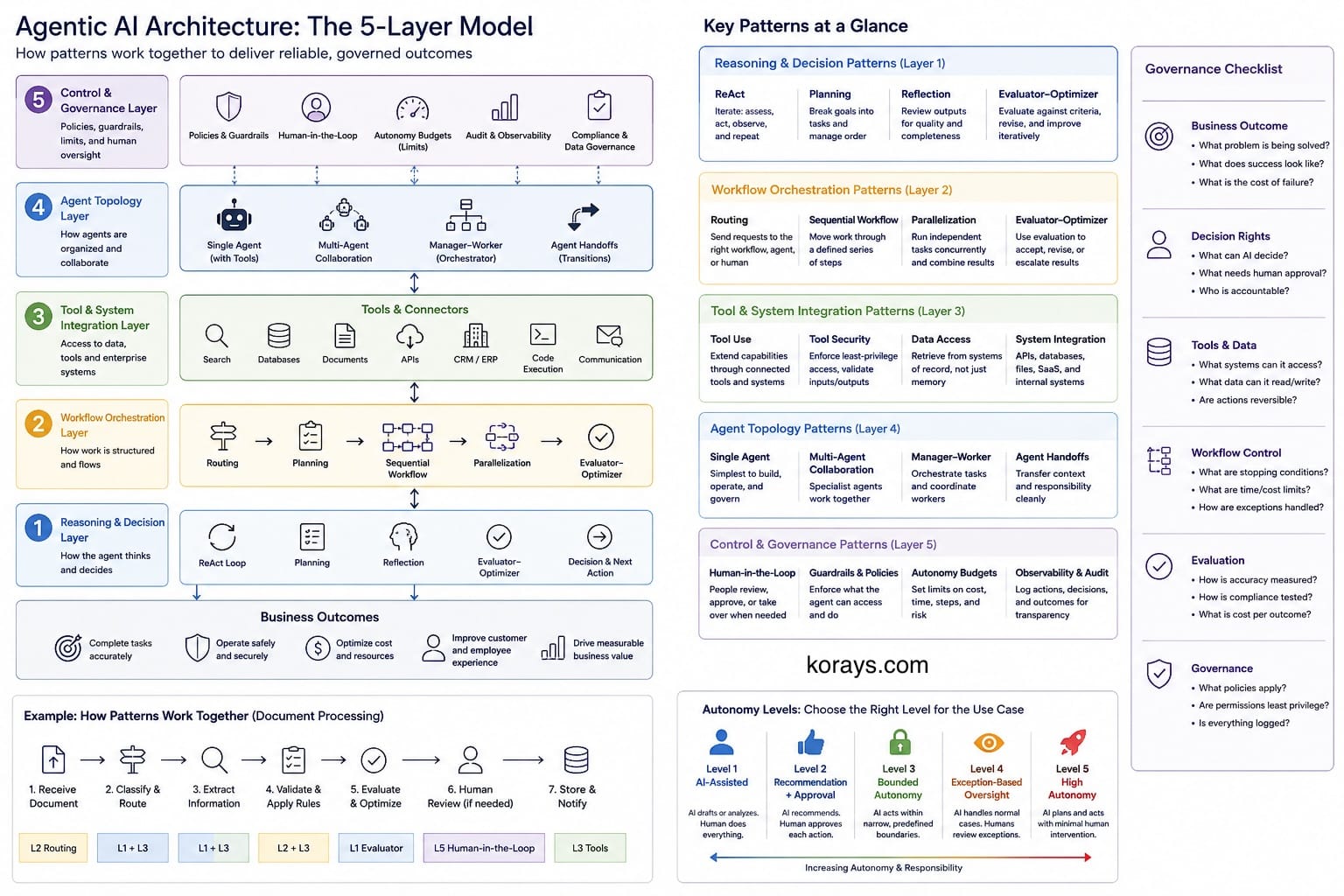
1. Reasoning and Decision Patterns
Reasoning patterns define how an agent determines what to do next.
They are useful when the task cannot be handled through a fully predetermined workflow.
ReAct
ReAct combines assessment and action in a loop.
A simplified version is:
Assess state → Select action → Execute action → Observe result → Update state
The agent continues until it reaches a satisfactory outcome, encounters a stopping condition or requires escalation.
This approach is useful for troubleshooting, research and investigative tasks where the next step depends on information discovered during execution.
However, open-ended loops require strong controls.
Without limits, an agent may repeatedly call tools, revisit the same information or continue working without improving the outcome.
A production ReAct workflow should normally include:
- Maximum iteration limits
- Tool-call limits
- Time and cost budgets
- Clear completion criteria
- Failure handling
- Escalation conditions
The objective is not to let the agent continue indefinitely. It is to give it enough flexibility to respond to uncertainty while remaining within controlled boundaries.
Planning
Planning allows an agent to divide an objective into smaller tasks before execution.
For example, an agent preparing a market assessment may identify workstreams covering:
- Market size
- Customer needs
- Competitors
- Regulation
- Technology options
- Recommendations
Planning improves structure, particularly when tasks have dependencies or require multiple information sources.
But planning is not always necessary.
For simple tasks, generating and maintaining a plan can add more model calls and context than the work itself requires.
Plans may also become outdated when new information appears.
A good planning approach should therefore support:
- Lightweight plans for simple tasks
- More detailed plans for complex tasks
- Replanning when assumptions change
- Validation of key dependencies
- Clear links between tasks and expected outputs
Planning should help execution, not become an additional layer of ceremony.
Reflection
Reflection introduces a review step after an output is produced.
The system asks whether the result is complete, clear, consistent and aligned with its instructions.
This can improve:
- Writing quality
- Code structure
- Completeness
- Formatting
- Adherence to requirements
However, reflection should not be treated as factual verification.
A model reviewing its own output may fail to detect the same unsupported assumption that produced the error in the first place.
For higher-risk use cases, reflection should be combined with:
- Authoritative data sources
- Deterministic validation
- Retrieval from approved documents
- Automated testing
- Independent evaluation
- Human review
Reflection is useful for improvement, but it is not evidence.
Evaluator–Optimizer
The evaluator–optimizer pattern makes the review process more structured.
One component generates an output. Another evaluates it against defined criteria. The result is then accepted, revised or escalated.
The flow may look like this:
Generate → Evaluate → Revise → Re-evaluate → Accept or escalate
The evaluator may be:
- Another language model
- A rule-based service
- A testing framework
- A retrieval or fact-checking process
- A human reviewer
For example, a code-generation system may:
- Produce code
- Run automated tests
- Review test failures
- Revise the code
- Stop after the tests pass or the retry limit is reached
A document-processing system may extract information and check whether all mandatory fields are present before accepting the result.
This pattern is stronger than vague self-critique because the evaluation criteria can be defined and measured.
However, the quality of the process still depends on the quality of the evaluator.
A weak evaluator can create false confidence.
2. Workflow Orchestration Patterns
Workflow patterns determine how tasks move through the system.
They are often more important than the behaviour of any individual agent.
Sequential Workflow
A sequential workflow moves work through a defined series of steps.
For example:
Receive document → Extract data → Validate fields → Apply business rules → Store result → Notify user
Some steps may use AI. Others should remain deterministic.
This is an important principle.
Language models are useful for tasks involving ambiguity, interpretation and unstructured information. They are usually less appropriate for:
- Exact calculations
- Permission checks
- Fixed business rules
- Transaction processing
- Workflow state
- Known field validation
A reliable architecture uses AI where it adds value and conventional software where predictability is more important.
Sequential workflows are particularly useful for:
- Document processing
- Customer onboarding
- Claims handling
- Case management
- Compliance reviews
- Internal approvals
They are also easier to monitor and audit than open-ended agent loops.
Their main limitation is flexibility. Unexpected cases need exception handling, routing or human intervention.
Routing
Routing determines which model, tool, workflow, agent or person should handle a request.
A customer-support platform may route:
- Password resets to self-service automation
- Billing questions to a billing workflow
- Technical issues to a support agent
- Complaints to a human team
- Sensitive requests to a specialist review queue
Routing may also be used to select models.
A smaller model may handle straightforward classification or summarisation, while a more capable model is reserved for complex analysis.
This can improve both cost and performance.
Routing may be implemented through:
- Deterministic business rules
- Classification models
- Language models
- Confidence thresholds
- Hybrid rule-and-model approaches
The main risk is misrouting.
A request sent to the wrong workflow may produce an incorrect response, expose information to the wrong component or create unnecessary delays.
Production routing should therefore include:
- Confidence scoring
- Fallback categories
- Human escalation
- Monitoring of routing accuracy
- Reclassification when new information appears
In many enterprise systems, effective routing is more useful than introducing more autonomous agents.
Parallelization
Parallelization allows independent tasks to run at the same time.
For example, a contract may be reviewed simultaneously for:
- Privacy obligations
- Cybersecurity requirements
- Regulatory risks
- Commercial terms
- Missing clauses
The outputs are then combined into a consolidated assessment.
Parallelization can reduce end-to-end processing time and bring multiple perspectives into the same analysis.
It is also useful for:
- Researching several sources
- Generating multiple options
- Comparing vendors
- Analysing different risk categories
- Running independent validation checks
However, parallel model calls can increase cost quickly.
The outputs may also conflict.
The architecture therefore needs an aggregation step that determines:
- How results are combined
- How duplication is removed
- How conflicts are resolved
- Which result has priority
- When human review is required
Parallelization works best when the subtasks are genuinely independent and the combination method is clearly defined.
3. Tool and System Integration Patterns
An agent becomes operationally useful when it can interact with real systems.
This is also where many of the largest risks appear.
Tool Use
Tools extend an agent beyond text generation.
They may include:
- Search services
- Databases
- Document repositories
- Customer relationship management platforms
- Ticketing systems
- Finance systems
- Calculators
- Code execution environments
- Communication tools
- Internal APIs
Tool use enables an agent to retrieve current information and perform actions.
It also creates a significant difference between an assistant and an autonomous system.
An assistant that drafts an email is relatively low risk.
An agent that sends the email, updates a customer record or approves a transaction requires much stronger controls.
Each tool should be treated as a privileged capability.
The architecture should define:
- What information the tool can access
- What actions it can perform
- Which identity it uses
- Whether actions are reversible
- What approval is required
- How inputs and outputs are validated
- How activity is logged
A tool should not receive broad access simply because the agent may need it.
Permissions should follow least-privilege principles.
Read access, write access and approval authority should be separated wherever possible.
Tool Security
Tool-connected agents face risks that do not exist in isolated chat interfaces.
These include:
- Prompt injection through external documents
- Malicious instructions contained in tool responses
- Accidental disclosure of sensitive information
- Excessive permissions
- Credential misuse
- Irreversible actions
- Unapproved data transfers
- Weak identity propagation
A tool response should therefore be treated as untrusted input.
An external document may contain instructions telling the agent to ignore its policies, disclose confidential information or perform an unrelated action.
The agent should not automatically follow those instructions.
Controls should exist outside the model to enforce:
- Allowed tool operations
- Data-access restrictions
- Approval requirements
- Transaction limits
- Jurisdictional controls
- Logging and monitoring
Standardised tool connectivity can simplify integration, but it does not make the integration secure.
Connectivity and authorization are different architectural concerns.
4. Agent Topology Patterns
Agent topology describes how responsibilities are divided across one or more agents.
Multi-agent designs can be useful, but they are often introduced too early.
Single Agent with Tools
The simplest agentic topology is one agent with access to a controlled set of tools.
This approach is often sufficient for:
- Internal knowledge assistants
- Customer-support agents
- Research tools
- Document-processing workflows
- Operational copilots
A single agent is usually easier to:
- Test
- Monitor
- Secure
- Troubleshoot
- Govern
- Operate cost-effectively
Before introducing multiple agents, teams should determine whether one agent with better instructions, routing and tools can complete the work.
Multi-Agent Collaboration
Multi-agent collaboration divides work among specialist agents.
A typical example is:
Researcher → Analyst → Writer → Reviewer
Each agent may have:
- A different role
- Different instructions
- Different tools
- Different permissions
- Different context
This can improve modularity when responsibilities are genuinely distinct.
However, agent specialisation should reflect an architectural need, not simply the desire to create several personas.
Multi-agent systems introduce:
- More model calls
- More context transfer
- More failure points
- Greater observability requirements
- More complex access control
- Less obvious accountability
They may also reproduce work.
Several agents can independently reach the same conclusion while consuming more time and tokens than a single controlled workflow.
Manager–Worker
The manager–worker pattern gives one agent responsibility for dividing and coordinating work.
The manager may:
- Interpret the objective
- Create work packages
- Assign tasks
- Monitor progress
- Combine results
- Reassign failed tasks
Worker agents may specialise in areas such as research, analysis, regulation or technical assessment.
This pattern works well when a large objective can be divided into relatively independent tasks.
However, the manager may become a bottleneck.
A poor decomposition by the manager can affect every worker.
The manager also requires enough context to coordinate the process, but it should not automatically receive unrestricted access to all systems.
Coordination responsibility and system privilege should remain separate.
Agent Handoffs
A handoff transfers responsibility from one agent or workflow to another.
For example:
- A support agent identifies a billing issue
- The case is transferred to a billing specialist
- The billing specialist identifies a fraud risk
- The case is escalated to a human investigation team
A good handoff should include:
- The current case state
- Relevant evidence
- Decisions already made
- Unresolved questions
- The reason for the transfer
- Expected next action
Passing only the conversation transcript is rarely enough.
Long transcripts may contain irrelevant information, while important conclusions may not be clearly identified.
Structured handoff state improves continuity, accountability and operational reliability.
5. Control and Governance Patterns
Agentic AI requires controls that match the impact of the decisions and actions being performed.
Governance should not be added after the system is built.
It should be part of the architecture.
Human-in-the-Loop
Human-in-the-loop design introduces points where a person reviews, approves, corrects or takes over a task.
This may be required before:
- Sending an external communication
- Updating an important business record
- Approving a payment
- Making a legal determination
- Acting on sensitive personal data
- Completing an irreversible action
Human review should not be a generic safety layer.
The architecture should specify:
- When review is triggered
- Who is responsible
- What information the reviewer sees
- What criteria they should apply
- How long they have to respond
- What happens if they do not respond
- How the decision is recorded
An approve-or-reject button without supporting evidence is not meaningful oversight.
The reviewer should see the proposed action, source information, risk indicators and relevant execution history.
Guardrails and Policy Enforcement
Guardrails define what the agent is allowed to do.
They may control:
- Which tools can be used
- Which data can be accessed
- Which models may process certain information
- Which actions require approval
- How much money can be spent
- How long a workflow may run
- Whether data may cross a geographic boundary
- How many retries are permitted
Some guardrails can be expressed through prompts.
Important controls should not rely on prompts alone.
A prompt such as “do not access confidential information” is not equivalent to an access-control policy that prevents the information from being retrieved.
Strong controls should be implemented through:
- Identity and access management
- Policy engines
- API gateways
- Data-loss prevention
- Network controls
- Transaction rules
- Approval workflows
- Audit logging
The model may recommend an action.
The surrounding control layer should decide whether that action is permitted.
Autonomy Budgets
Agentic systems should operate within explicit limits.
These limits may include:
- Maximum model calls
- Maximum tool calls
- Maximum execution time
- Maximum cost per workflow
- Maximum transaction value
- Maximum number of retries
- Maximum number of records changed
These limits can be viewed as an autonomy budget.
The agent is allowed to operate independently within the budget. Once the limit is reached, it must stop, request approval or escalate.
This is a practical way to introduce autonomy without giving the system unlimited discretion.
State and Memory
Agentic workflows need a reliable method of maintaining state.
It is useful to distinguish between several types of information.
Workflow State
Workflow state describes where the process currently stands.
It may include:
- Current step
- Completed tasks
- Pending tasks
- Intermediate results
- Errors
- Approvals
- Retry count
- Execution status
Workflow state should normally be stored outside the language model so that the process can be recovered, audited and resumed.
Conversation Context
Conversation context contains recent interactions relevant to the current request.
It is useful for continuity, but it should not automatically be treated as authoritative.
Users may provide incorrect information. The model may misunderstand earlier statements. Long conversations may also exceed context limits.
Working Memory
Working memory holds temporary information used during a task.
Examples include:
- Research notes
- Intermediate calculations
- Candidate options
- Temporary summaries
This information may be discarded after the workflow ends.
Long-Term Memory
Long-term memory retains information across sessions.
This may include preferences, previous decisions or recurring context.
Long-term memory introduces governance questions around:
- Consent
- Accuracy
- Retention
- Correction
- Deletion
- Access
- Data residency
Incorrect or outdated memory can influence future decisions, so stored information should not be treated as permanently correct.
Systems of Record
Authoritative business information should remain in systems of record.
Examples include:
- Customer data in a CRM
- Financial data in an accounting platform
- Employee data in an HR system
- Contract records in a document-management system
For material decisions, agents should retrieve current information from these systems rather than relying on conversation history or memory.
Memory supports the workflow. It should not silently replace the system of record.
Choosing the Right Level of Autonomy
Autonomy should be introduced gradually.
A useful progression is:
Level 1: AI-Assisted
The AI produces content or analysis for a person.
The person remains responsible for every decision and action.
Examples include:
- Drafting an email
- Summarising a report
- Suggesting responses
- Generating options
Level 2: AI Recommendation with Approval
The system recommends an action, but a person must approve it.
Examples include:
- Recommending a customer response
- Suggesting a transaction category
- Proposing a remediation action
- Preparing a contract-risk assessment
Level 3: Bounded AI Action
The system may act independently within narrow limits.
Examples include:
- Updating a low-risk record
- Sending a standard internal notification
- Categorising a support request
- Retrieving approved information
Level 4: Exception-Based Oversight
The system handles normal cases automatically and escalates exceptions.
Examples include:
- Processing standard documents
- Handling routine service requests
- Completing low-risk compliance checks
- Managing predictable operational workflows
Level 5: Higher Autonomy
The system plans and performs complex work with limited intervention.
This level should be reserved for use cases where:
- Performance has been demonstrated
- Failure modes are understood
- Controls are mature
- Actions are reversible where possible
- Monitoring is continuous
- Accountability is clear
Autonomy should be earned through evidence.
It should not be assumed because the underlying model appears capable.
Combining Patterns in Real Systems
The following examples show how the patterns can work together.
Customer-Support System
A customer-support platform may combine:
- Routing to classify the request
- Tool use to retrieve account information
- Sequential workflows for standard requests
- ReAct for troubleshooting
- Human-in-the-loop for complaints or sensitive cases
- Guardrails to prevent unauthorised account actions
The architecture may allow the system to answer common questions independently while requiring approval before refunds, account closures or contractual changes.
Document-Processing Platform
A document-processing workflow may combine:
- Sequential processing
- Tool use
- Evaluator–optimizer
- Human review
- Policy enforcement
The flow may be:
- Receive the document
- Extract text
- Classify the document
- Extract required fields
- Validate the results
- Apply business rules
- Escalate low-confidence cases
- Store the approved result
This is agentic in selected areas without turning the whole process into an autonomous agent.
Research Assistant
A research assistant may combine:
- Planning
- Parallelization
- Tool use
- ReAct
- Evaluation
- Human review
The system may divide a question into workstreams, research several sources, compare findings and evaluate the final output against defined requirements.
A person may still be responsible for approving conclusions before they are used in an important decision.
Software-Development Agent
A development agent may combine:
- Planning
- Tool use
- Evaluator–optimizer
- Guardrails
- Human approval
The system may:
- Review a development request
- Create a plan
- Modify code
- Run tests
- Review failures
- Revise the implementation
- Submit the change for approval
The agent should not automatically deploy to production simply because the tests pass.
Production access, change approval and deployment remain separate control concerns.
Enterprise Case Management
A case-management system may combine:
- Routing
- Agent handoffs
- Tool use
- Human-in-the-loop
- Policy enforcement
- Durable workflow state
Cases may move between service, finance, compliance and human investigation teams while maintaining a consistent record of ownership and evidence.
Evaluating Agentic Systems
A convincing response is not the same as a successful business outcome.
Evaluation should focus on whether the system completed its intended task correctly, safely and efficiently.
Useful measures include:
- Task-completion rate
- Factual accuracy
- Tool-selection accuracy
- Routing accuracy
- Policy compliance
- Human correction rate
- Escalation quality
- Retry frequency
- Cost per completed task
- Cost per successful outcome
- End-to-end latency
- User satisfaction
- Business impact
Evaluation should also include failure scenarios.
Teams should test what happens when:
- A tool is unavailable
- Data is missing
- Instructions conflict
- A document contains malicious content
- The model is uncertain
- The retry limit is reached
- A human does not respond
- A workflow is interrupted
A system that performs well only under ideal conditions is not production-ready.
Cost and Token Economics
Agentic systems can generate many more model calls than traditional chatbot applications.
A single workflow may include calls for:
- Classification
- Planning
- Retrieval
- Tool selection
- Tool-result interpretation
- Reflection
- Evaluation
- Agent-to-agent communication
- Retry handling
- Final response generation
The cost of the workflow is therefore more important than the cost of an individual prompt.
Organizations should monitor:
- Model calls per workflow
- Tool calls per workflow
- Context size
- Retry frequency
- Model selection
- Cost by business unit
- Cost by use case
- Cost per successful outcome
The largest model should not be used for every step.
Smaller or specialised models may be sufficient for:
- Classification
- Routing
- Data extraction
- Simple validation
- Summarisation
More capable models can be reserved for complex planning or analysis.
Cost optimization should not be based only on token prices. It should also consider accuracy, retries, latency and the cost of human correction.
A cheaper model that repeatedly fails may be more expensive at the workflow level.
Observability and Auditability
Agentic systems require more than traditional application logs.
Teams need to understand how the system moved from an input to an outcome.
Useful records include:
- Workflow state transitions
- Model and version used
- Tool calls
- Retrieved sources
- Permission checks
- Evaluation results
- Human approvals
- Errors
- Retries
- Costs
- Latency
- Final outcomes
The objective is not to store hidden model reasoning.
The objective is to maintain an operational record of:
- What information the system received
- What action it selected
- Which tools it called
- What results it obtained
- What controls were applied
- What outcome was produced
Without this level of observability, it becomes difficult to:
- Investigate failures
- Improve performance
- Demonstrate compliance
- Allocate costs
- Compare models
- Establish accountability
Observability is part of the product, not an optional support feature.
A Practical Architecture Checklist
Before deploying an agentic workflow, teams should be able to answer the following questions.
Business Outcome
- What business problem is being solved?
- What does success look like?
- Is AI necessary for every step?
- What is the cost of an incorrect outcome?
Decision Rights
- Which decisions can the model make?
- Which decisions remain deterministic?
- Which decisions require human approval?
- Who is accountable for the final outcome?
Tools and Data
- What systems can the agent access?
- What data can it read?
- What data can it change?
- Are actions reversible?
- How is identity propagated?
- What happens if a tool fails?
Workflow Control
- What are the stopping conditions?
- How many retries are permitted?
- What cost and time limits apply?
- How are exceptions handled?
- Can the process be resumed after failure?
Evaluation
- How will accuracy be measured?
- How will tool selection be tested?
- How will policy compliance be assessed?
- What is the human correction rate?
- What is the cost per successful outcome?
Governance
- Which policies apply?
- Are permissions based on least privilege?
- Is human approval required for high-impact actions?
- Are all important activities logged?
- Is there a clear incident-response process?
If these questions cannot be answered, the architecture is probably not ready for higher autonomy.
Where Agentic Architecture Is Heading
Agentic AI is likely to move beyond isolated chatbot interfaces and become embedded within business processes.
Several trends are likely to shape the next stage.
Hybrid Workflows
The most effective systems will combine:
- Deterministic software
- AI interpretation
- Automated actions
- Human judgment
The future is unlikely to be fully manual or fully autonomous.
It will be hybrid.
Shared AI Control Layers
As organizations deploy more models and agents, they will need common controls for:
- Identity
- Permissions
- Model access
- Tool access
- Cost monitoring
- Data handling
- Policy enforcement
- Audit trails
Without shared control, each agent may become its own isolated implementation with inconsistent governance.
Policy-Aware Execution
Agents will increasingly operate within business, regulatory and data policies.
The model may help interpret policy, but enforcement should remain in trusted systems outside the model.
Durable, Long-Running Workflows
Some workflows will continue for hours, days or weeks.
These systems will need:
- Persistent state
- Recovery after interruption
- Version control
- Human checkpoints
- Clear ownership
- Reliable event handling
This will make agentic architecture look increasingly similar to distributed workflow and case-management architecture.
Outcome-Based Management
Organizations will move away from measuring only model usage.
They will focus more on:
- Cost per outcome
- Quality per outcome
- Risk per outcome
- Human effort avoided
- Business value created
This is a more useful basis for managing enterprise AI than token consumption alone.
Conclusion
Agentic AI design patterns are useful building blocks, but individual patterns do not create a production architecture by themselves.
The real work is deciding how the patterns fit together.
A reliable agentic system must define:
- How decisions are made
- How work is orchestrated
- Which tools are available
- How responsibilities are divided
- What information is retained
- Which controls are enforced
- When humans become involved
- How outcomes are evaluated
The best architecture is not the one with the largest number of agents or the highest level of autonomy.
It is the one that uses the least autonomy necessary to achieve the required business outcome while maintaining acceptable levels of reliability, security, cost and accountability.
Agentic AI should not be designed around the question:
How much can the agent do?
It should be designed around a more important question:
What should the agent be allowed to decide, and under what conditions?
That distinction will determine whether agentic AI becomes another layer of uncontrolled complexity or a reliable part of enterprise architecture.